Adapted and expanded from my Chinese answer on Zhihu to “In the age of vibe coding, are Emacs users about to go extinct?”, originally published on October 2, 2026.
Emacs has become my AI coding workbench. I use it to work with coding agents, but also to change the environment in which those agents and I work. That second part has become increasingly useful.
I normally interact with Codex, Cursor, and Claude through agent-shell, an Emacs client built around the Agent Client Protocol, or ACP. Over time, familiar interruptions started cropping up.
- A task would stop after a transient error and wait for me to type “continue.”
- I would leave my computer and lose a convenient way to follow progress or respond to a permission request.
- Starting another session meant explaining the background again.
- And so on.
To address those interruptions, I gradually added a mobile chat bridge, bounded retries, and formula rendering. While doing that, I kept experiencing the same satisfying loop: an agent helped me edit Emacs Lisp, I hot-reloaded the changes into the running editor, and the tool improved while I was using it.
That is the argument I want to make for this environment. The software I am developing and the tools I use to develop it can evolve together. Emacs makes the distance between finding friction and changing its cause unusually short.
My Emacs config: https://github.com/zhaozhixu/emacs.d
One session, two ways in
There are three main parts to my setup.
Emacs provides source editing, the Lisp runtime, and the place where agent-shell and my bridge run. Agent-shell provides the conversation interface and session records, communicating over ACP with an external agent process. The agent process owns its model calls and tool execution. Which executable or adapter is needed depends on the agent; the upstream setup instructions are the right place to check that boundary.
My bridge connects an agent-shell session to a chat in Lark. In front of my computer, I use the Emacs buffer. On my phone, I use the chat. Both lead to the same session.
The diagram below shows how these parts fit together.
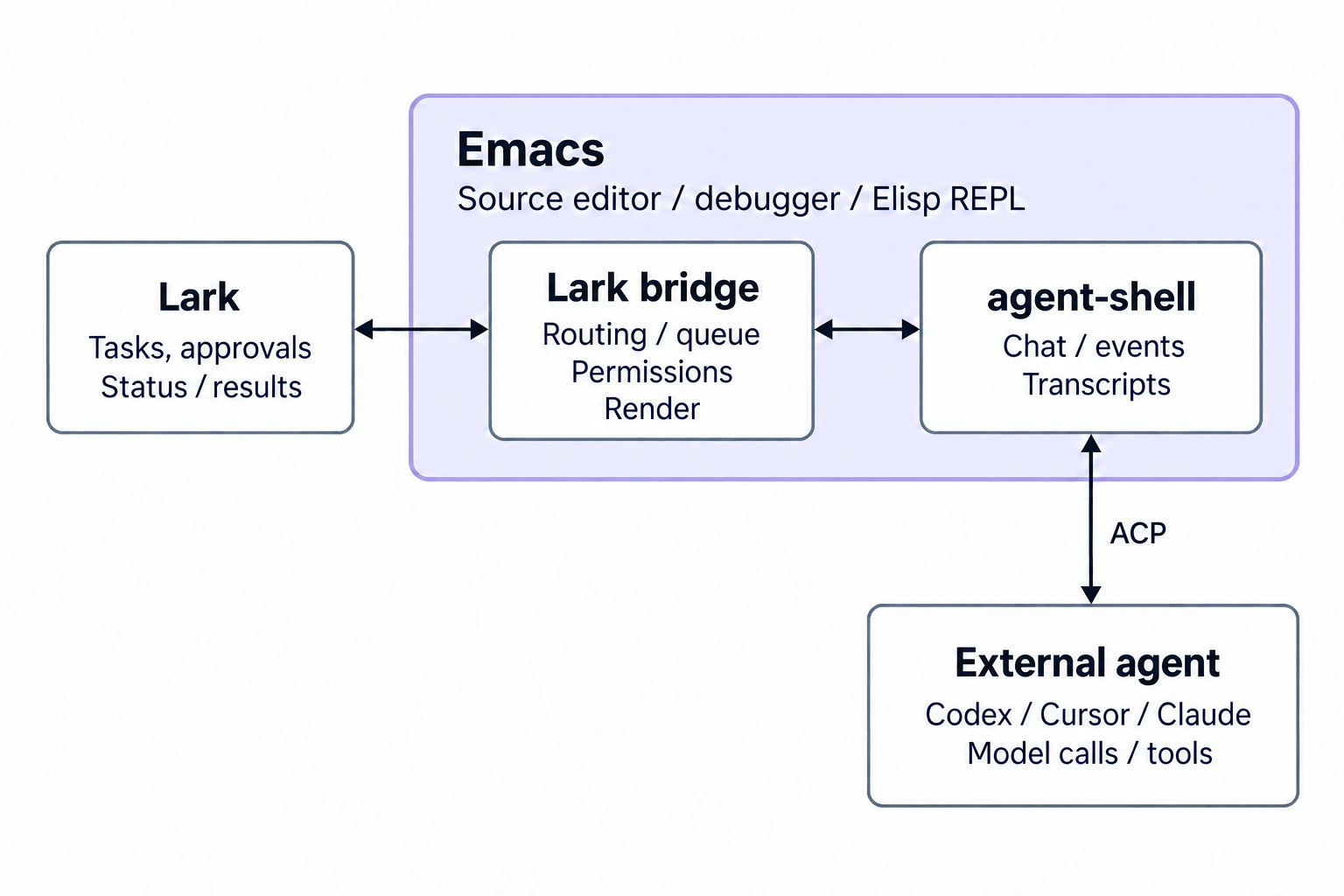
A mobile connection that preserves the session
The bridge binds one chat to one agent-shell session. An incoming chat message identifies the corresponding Emacs buffer through the chat ID. If the agent is idle, the bridge submits the message. If it is busy, the bridge queues it.
Messages, permission requests, and errors travel back to the original chat. The useful property is continuity: I can leave my desk without immediately losing contact with the work already running there. I do not have to start another agent on the phone and reconstruct what the first one was doing.
Handling permission requests is part of that continuity. Forwarding the final answer would help me read the result, but it would not help when the session pauses to ask for a decision. The mobile interface needs a way to return that decision to the waiting session.
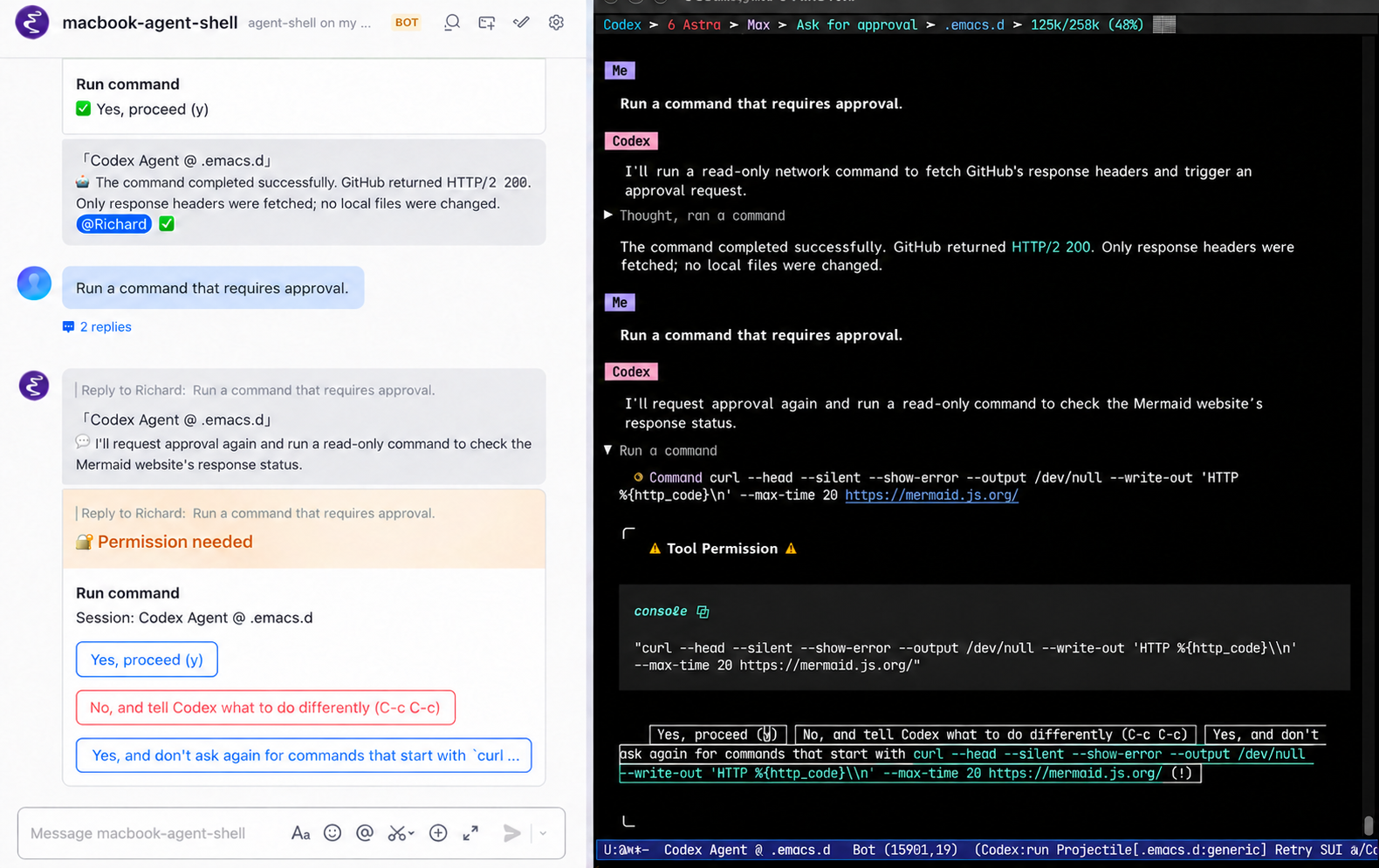
My setup uses lark-cli and a bot application configured through the Lark developer console. The bridge needs the appropriate app permissions, a persistent event connection, and interactive card callbacks.
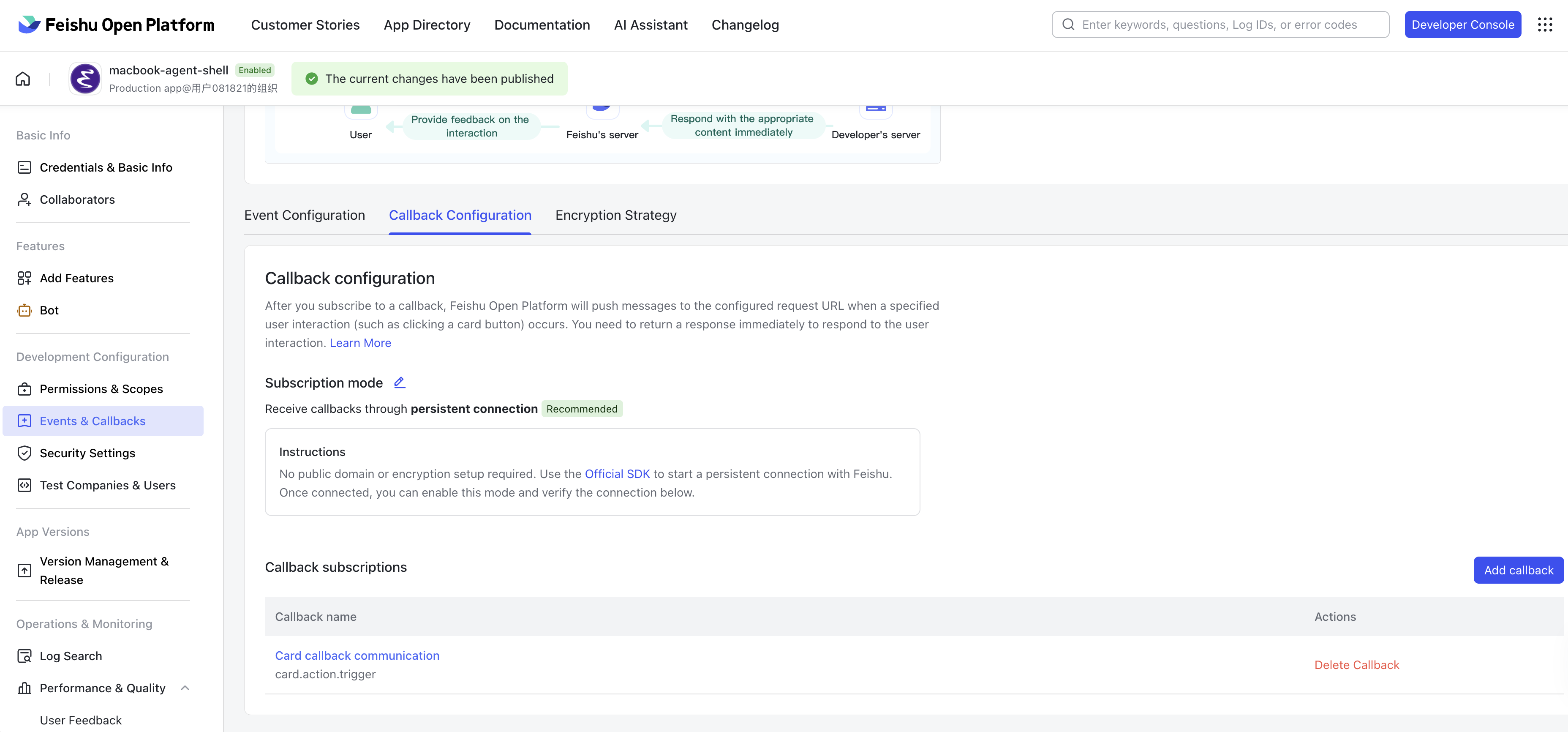
I am describing an extension I use, rather than announcing a separately released bridge package. The interesting design choice is that mobile access extends an existing development session instead of creating a competing source of state.
Retry the failures I can recognize
Some failures did not arrive as protocol errors. The agent printed a recognizable transient-error message, then ended the turn normally. From the client’s perspective, the turn had finished; from mine, the task had simply stopped.
My extension watches agent-shell events, including messages, new input, and turn completion. It examines the end of the output for known error patterns before deciding whether to schedule another turn.
The configuration I use allows five retries, with delays of 5, 10, 20, 40, and 80 seconds. The retry message uses a template that includes the previous prompt. If I submit a new request, the pending timer is canceled and the retry count resets.
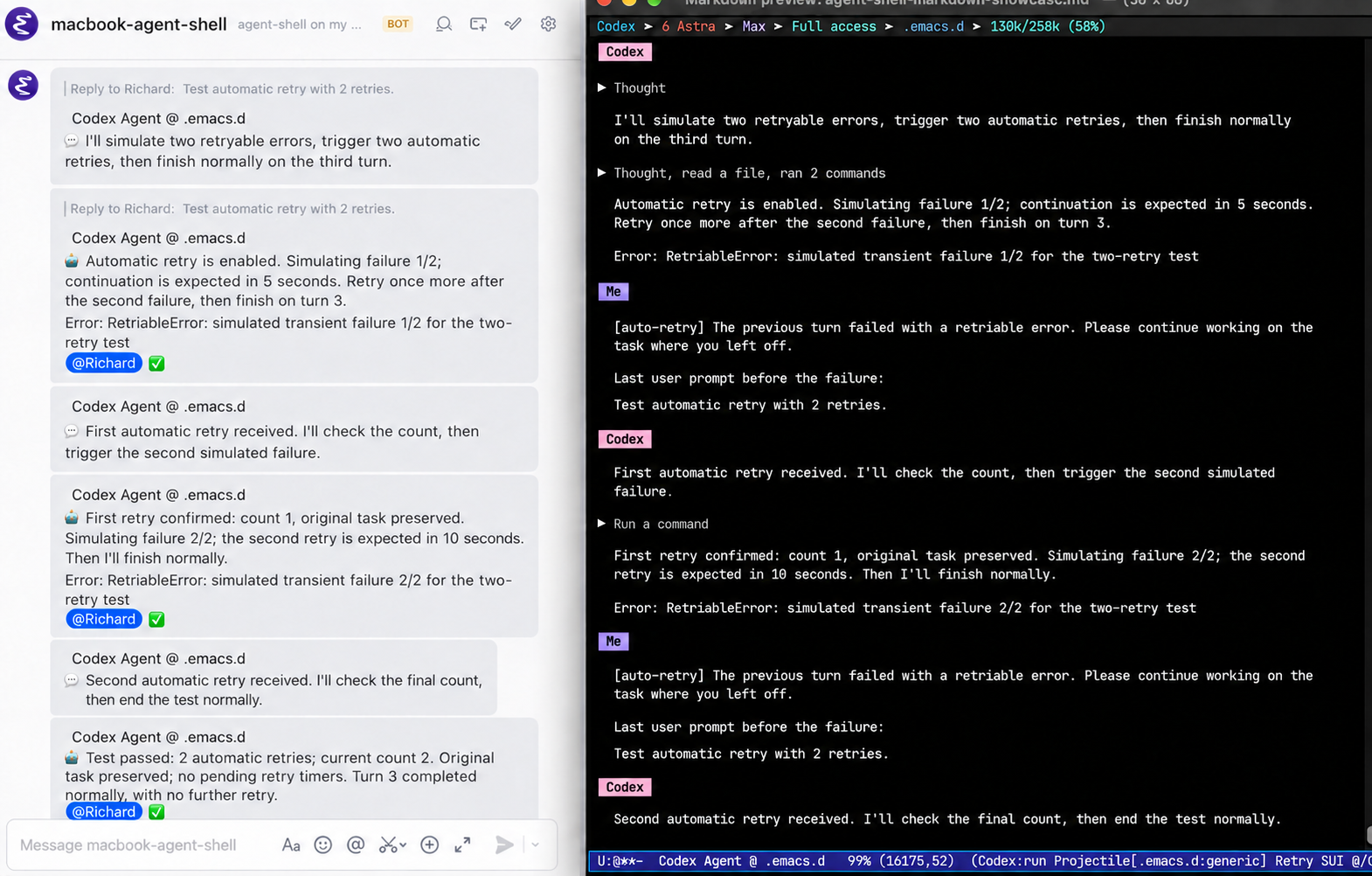
I raised this problem in agent-shell issue #734 and proposed an implementation in PR #735. The pull request was closed because agent-shell’s author believes error patterns belong in users’ configurations. Instead, we agreed to expose the interfaces needed for mechanisms like this, including message events.
Transcripts as a handoff, and as a trap
Cross-session context reuse relies on agent-shell’s existing transcript capability. A session records its conversation and tool output. Another session can read that record to recover requirements, decisions, and progress.
For example, I can discuss a design with Claude and ask a new Codex or Cursor session to read the transcript before implementing it. The same technique helps after restarting an agent. It does not transfer some hidden shared memory; it gives the next session a document to read.
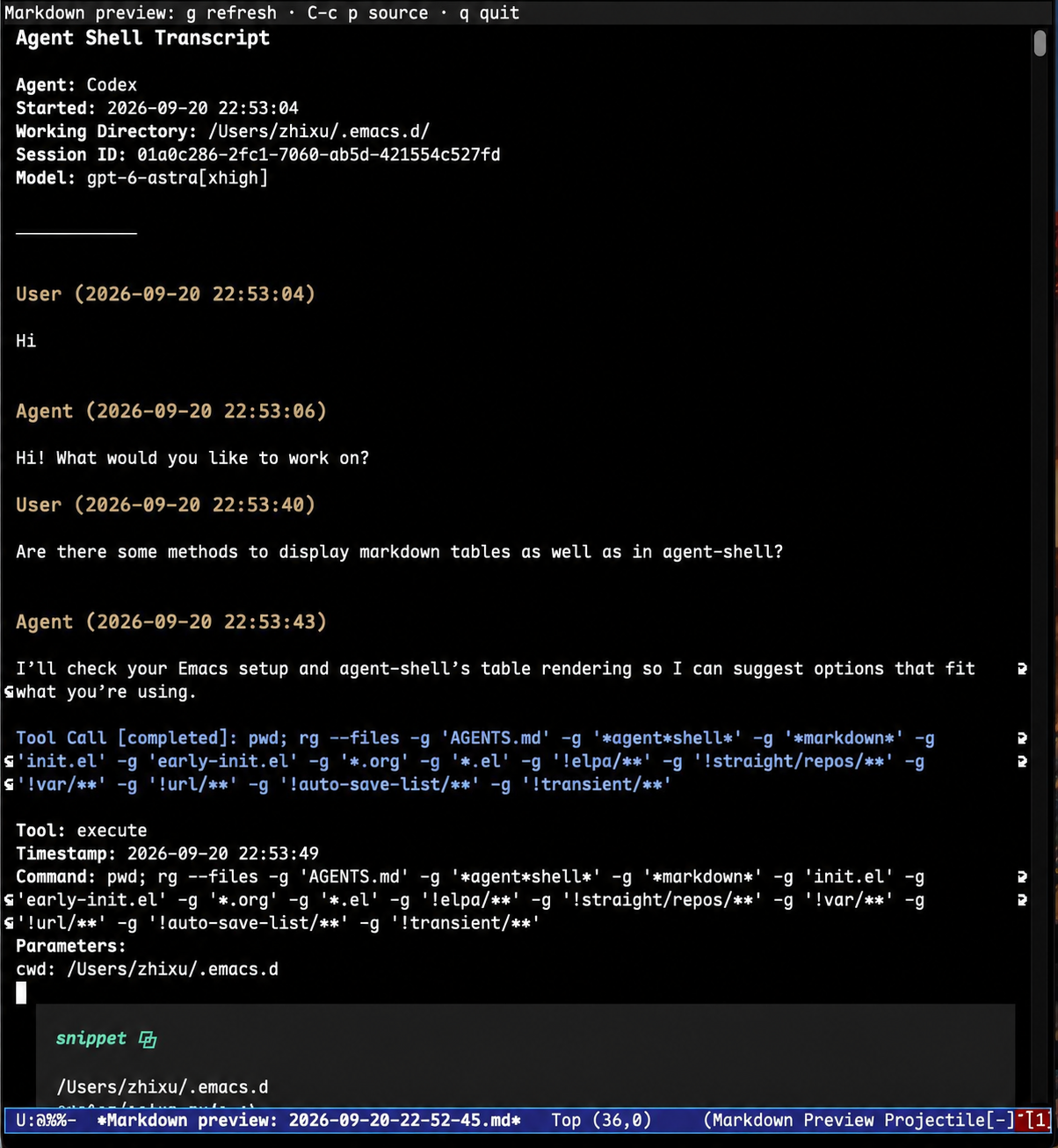
There is a surprisingly easy way to make this go wrong. By default, agent-shell puts transcripts under .agent-shell in the project. If I repeatedly ask the same session to read those files, the tool output becomes part of the new transcript. The next read can include the previous read, which already included an earlier copy of the conversation.
The record begins to reproduce itself. In my experience, this can exhaust the context budget in an instant and cause tools such as rg or grep to slow to a crawl or hang.
My practical response is to keep transcripts outside the working tree, in a dedicated location such as a directory under ~/.cache, and move to a fresh session when appropriate. Agent-shell exposes agent-shell-transcript-file-path-function for choosing the path.
Small improvements to reading
Some changes were less about task continuity and more about making the conversation pleasant to read.
When discussing algorithms or mathematical derivations in Lark, I wanted typeset equations alongside the explanation. I added optional handling for block formulas delimited by $$...$$ or \[...\]. The bridge renders them with MathJax to SVG, converts the result to PNG, uploads it, and places the image where the formula appeared in the message.
Rendering and uploading happen asynchronously on the local machine. If a formula appears again, the bridge can reuse the uploaded image. If rendering or uploading fails, the bridge falls back to sending the original text, so the message still gets through.

Developing the tool I am already using
The bridge and retries solve specific problems. The part that makes the whole arrangement compelling is how I can develop those solutions.
Emacs is a running Lisp environment. With an Emacs server available, an agent can use emacsclient to evaluate an expression, inspect a definition, or load an edited Elisp file into the editor I am already using. The Emacs manual documents --eval, which provides a small, direct entry point into that loop.
For a minimal illustration, with a server running:
emacsclient --eval '(+ 1 2)'That evaluates in the existing Emacs process. A read-only inspection such as this can help locate a loaded definition:
emacsclient --eval '(symbol-file (quote agent-shell) (quote defun))'The useful next step is to inspect and edit the relevant source, then evaluate the changed definitions or load the file. I can observe the result directly in the same environment.
A Markdown preview command was a concrete example. I liked how agent-shell displayed tables and code, and wanted the same rendering for ordinary Markdown files. I reused its renderer in a preview command: C-c p opened a read-only preview, g refreshed it, and q returned to the source.
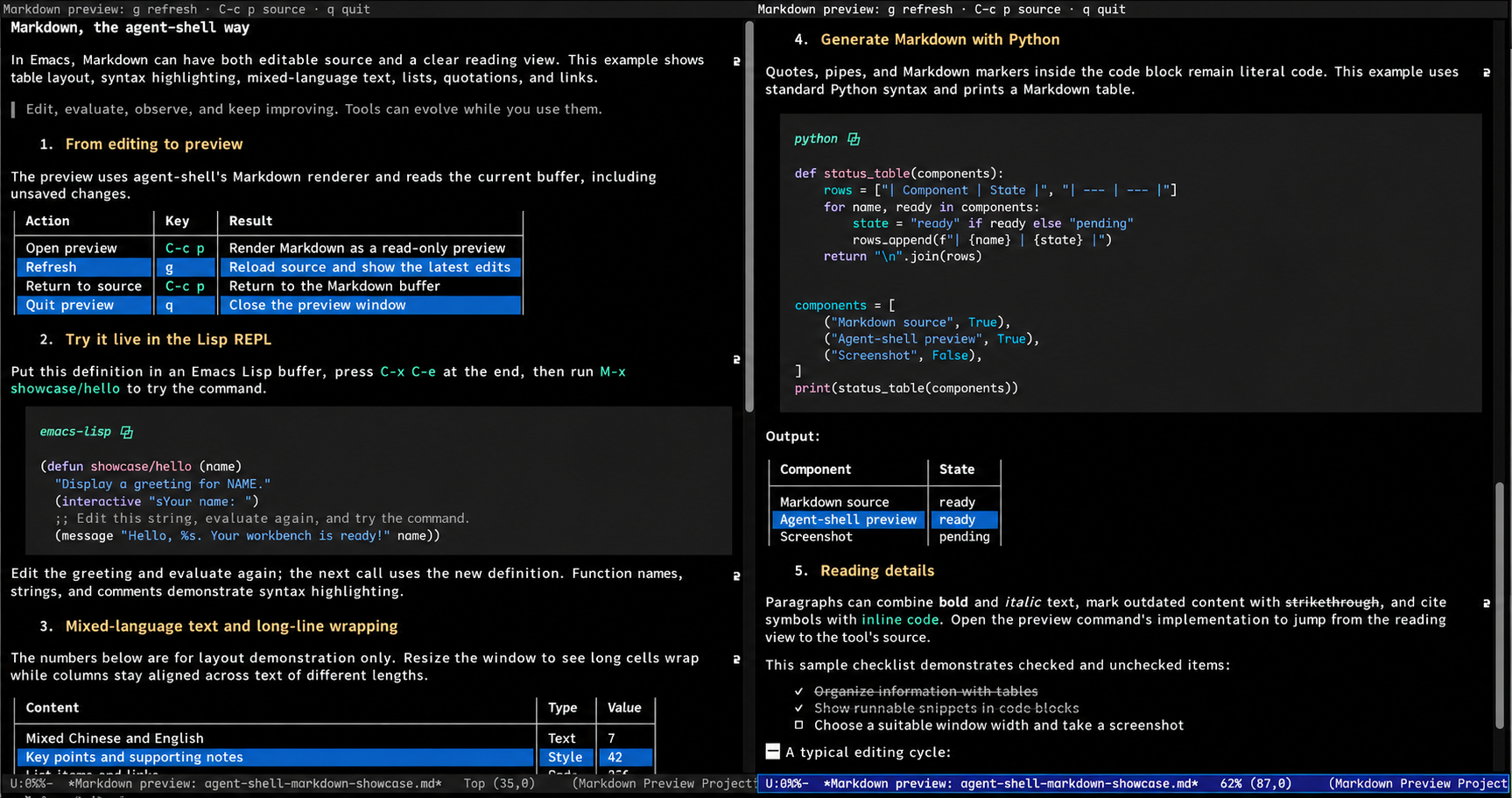
The entire process—from identifying an issue and examining the implementation to modifying the code and testing the changes through hot reloading—took less than five minutes, all within the same environment. The agent helps me improve Emacs, and I can instantly hot-reload those improvements into my current workflow. This is the “what you write is what you see” experience I value: an incredibly short feedback loop between development and use.
Hot reloading also means being able to inspect and modify existing Lisp state—symbol bindings, event subscriptions, and timers—at any time. Managing that state so effortlessly is a unique advantage of Emacs as a Lisp REPL environment.
Extending the same idea into the backend
Emacs and agent-shell let me change the editing environment and the interaction layer. There is another boundary: the agent’s own execution loop.
DeepSeek Harness, or DSH, interests me because it exposes a plugin-based agent runtime. It offers a way to examine concerns such as model access, tools, sessions, and execution inside the backend itself.
Retries illustrate the distinction. My Elisp extension sees a recognizable error after a turn ends and sends another prompt. DSH’s model-request retry plugin works at a failed agent-step boundary within an open turn. That is a different place to implement recovery, with more direct knowledge of the failed request.
DSH also supports reloading plugin source code and configuration at runtime—a workflow that mirrors the development experience I’ve enjoyed in Emacs: edit, load, observe the results, and keep tweaking. It also provides an ACP interface for connecting agent-shell. Once connected, the two form a seamless AI development environment—from the client all the way to the execution backend—that I can continuously modify and test.
The user as developer
Emacs, agent-shell, and DSH have shown me just how powerful the combination of open source and AI is. We have the freedom to understand, modify, combine, and replace our tools, and AI lowers the barrier to exercising that freedom. When the editing environment, interactive client, agent execution framework, and the models themselves are all open to developers, we can trace workflow problems along the call chain to the specific implementations, make changes exactly where they belong, and keep the feedback loop going. A change made to solve a personal problem can grow into an extension, a plugin, or an upstream contribution that benefits future projects and other users.
When the user is also the developer, software productivity reaches its pinnacle.