Adapted from my Chinese answer on Zhihu to “What are some clever Python tricks?”, originally published on August 2, 2026.
Imagine a Python service—or a large-model training job—that has been running for three days. Its memory holds a state you finally managed to reproduce after a great deal of effort. Then you discover a bug in one function. The usual workflow is to change the code, restart, and pray that the strange state builds up again. Most likely, it never will.
Could you walk up to the running process instead? Look at its thread stacks, evaluate a few expressions, even replace the troublesome function on the spot—and put the old one back if the change turns out to be wrong?
This is about how much easier Python 3.14 makes that, and a tool I built around it: pyvivo.
The background to this experiment is my essay on software engineering in the age of agents: Why Faster AI Coding Does Not Mean Faster Development.
Why debugging a running process is hard
Traditionally, if you wanted to understand what was happening inside a running Python process, your options fell into three broad categories:
- Logging. Familiar, convenient, and everywhere. But you only see the things you thought to log in advance. Want one more variable? Change the code and restart. It takes time and destroys the scene you wanted to investigate.
- pdb and breakpoints. Interactive inspection is possible, but
breakpoint()andpdb.set_trace()also have to be placed in the code ahead of time. - py-spy. Like Linux
perf, this kind of dynamic tracing tool can already read the target process’s memory and reconstruct its call stacks, with almost no intrusion. But it is a read-only sampler. It can tell you where the process is stuck and what it is doing; it cannot evaluate expressions inside the process or change its logic.
For a traditional tool that can both attach and make changes, that leaves GDB. CPython supplies extensions such as py-bt and py-locals, and you can force it to execute code through GDB too. But GDB fundamentally sees C call stacks. Making sense of them as Python requires CPython’s debugging information. When you attach and execute code, you are calling C functions, and one careless move can crash the process.
Programming inside a live system
This way of programming is hardly new. Lisp programmers have been doing it for decades: a REPL—read, evaluate, print, loop—connected to an image that keeps running. Developing the program means continually asking it questions, changing it, and observing it. The running process becomes something you can have an ongoing conversation with.
In 1999, NASA’s Deep Space 1 carried control software written in Common Lisp. During the experiment, a race condition caused a deadlock, with the spacecraft more than a hundred million kilometers from Earth. The team used Lisp’s live REPL to reach the running process, diagnose the problem, and fix it in place. As Ron Garret recalled:
Debugging a program running on a $100M piece of hardware that is 100 million miles away is an interesting experience.
The Unix community has its own long tradition of dynamic tracing. Linux eBPF is a particularly striking example: attach probes to almost any kernel function at runtime, observe any state, collect any data, even filter and modify packets.
The direction AI agents have taken over the past couple of years makes this interesting all over again. An agent that can debug needs exactly the same loop: inspect, change, verify, roll back. Large language models are already powerful. Writing a one-off script is no problem. But when working on a service that stays online for a long time, an agent needs a persistent, stateful window into the process—one it can keep asking questions through.
A process can expose such a window itself. manhole, for example, lets a process start a listener at launch. The hard part is injecting that listener at runtime into a process that made no preparations for it.
Injection is difficult because you cannot simply make the target execute bytecode at an arbitrary moment. If a thread is halfway through an operation—updating a dict, for example—running code at that point can corrupt the interpreter’s internal state. Before PEP 768, injecting code into an unprepared process meant reaching for GDB or ptrace, writing memory directly, and hijacking threads. Fragile and dangerous.
PEP 768 standardizes that step. It waits until the interpreter reaches a safe evaluation point—roughly, between bytecode instructions, without unsafe internal locks held—then runs the injected script. Safely injecting a bootstrap script into an arbitrary process becomes an official, cross-platform operation.
That safe point applies to the initial injection. Once the listener is installed, it is an ordinary thread. For everything after that, pyvivo supplies a general communication protocol through which we can inspect the process, apply live patches, roll them back, and keep working.
The opening provided by sys.remote_exec
Python 3.14 implements PEP 768, Safe external debugger interface for CPython. At its heart is one function:
sys.remote_exec(pid, script_path)Its meaning is simple: when process pid next reaches a safe point, run the Python file at script_path once.
The call returns immediately. The target carries on with its work until it naturally reaches the next safe point, then reads and executes the script. The interpreter’s state stays internally consistent throughout.
That is the whole trick. A one-shot channel that runs one script is already enough to build a debugging agent we can talk to repeatedly.
One agent inside and one controller outside
I named the tool pyvivo after the Latin in vivo, “within the living,” as opposed to in vitro, “in glass”—in a test tube, outside the living organism. Reading source offline or analyzing a core dump is in vitro. Working on the running process itself is in vivo.
The architecture is borrowed straight from the classic SLIME/SWANK design in the Emacs and Lisp world: a probe inside the process, a controller outside it, and a socket between them.
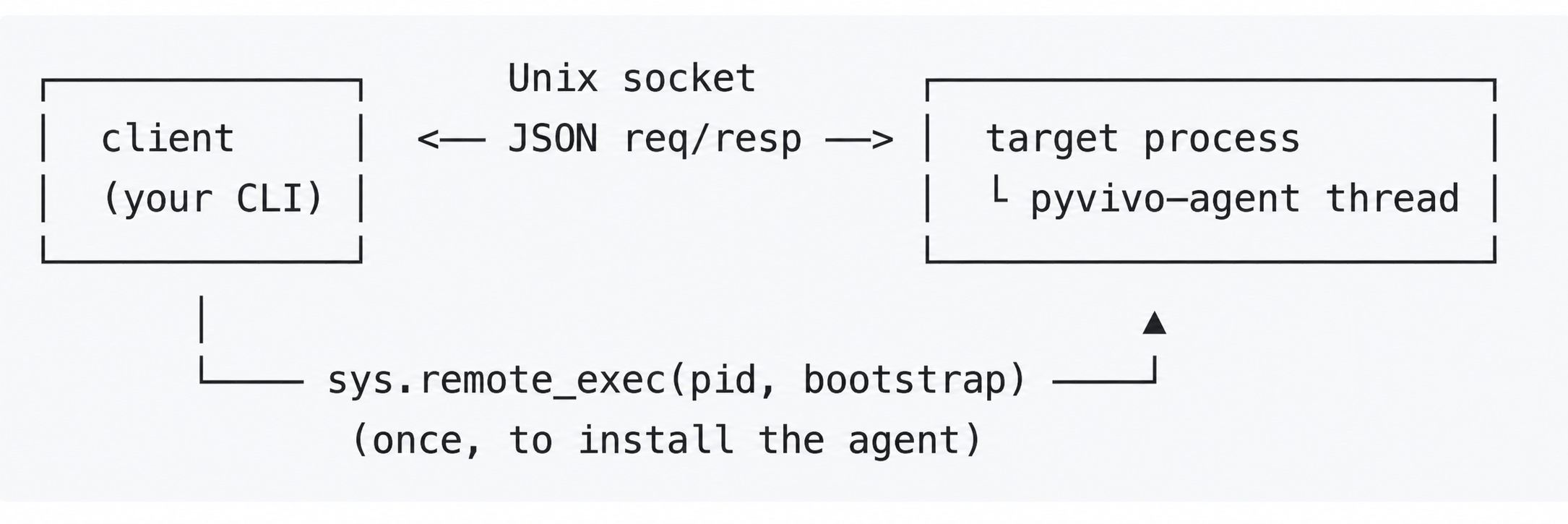
- Inject the agent. The client writes a bootstrap script to a temporary directory and calls
sys.remote_exec(pid, bootstrap). When the target reaches a safe point, it executes the script. The script usesrunpyto load the agent module into the target process, then callsinstall(socket_path). - Start the listener. Inside the target,
install()binds a Unix-domain socket, applieschmod 0600so only its owner can connect, and starts a daemon listener thread namedpyvivo-agent. - Ask questions. Each subsequent client command connects to the socket, sends one line of JSON, and reads one line back. For example,
{"op": "eval", "source": "compute(3)"}asks the agent to evaluate an expression inside the target and return itsrepr. The protocol is plain newline-delimited JSON. Nothing fancy.
A concrete example
Once the agent is installed, a long-running process becomes something you can query at will. The pyvivo repository includes an example like this:
counter = 0
multiplier = 2

def compute(value: int) -> int:
    return value * multiplier
In the commands below, PID is the target process’s ID.
Inspect the process
Threads, call stacks, local variables: sys._current_frames() gives us a concurrent snapshot.
python -m pyvivo remote PID threads    # Threads and their current stack tops.
python -m pyvivo remote PID stack      # The main thread's call stack.
python -m pyvivo remote PID locals --frame 0
Evaluate expressions
Run an expression in the target process’s namespace:
python -m pyvivo remote PID eval 'compute(3)' # -> 6Patch a function live
This is the fun part. Write a new compute:
# patch_compute.py
def compute(value: int) -> int:
    return value * 100
Then apply it:
python -m pyvivo remote PID patch __main__:compute patch_compute.py
python -m pyvivo remote PID eval 'compute(3)'   # -> 300, immediately.
Underneath, pyvivo assigns the new function’s __code__—its code object—to the old function object. The function’s identity does not change. Everywhere that already holds a reference to that function automatically uses the new logic on its next call.
Roll it back
Every patch has an ID and retains the old code object, so it can be rolled back:
python -m pyvivo remote PID rollback PATCH_ID
python -m pyvivo remote PID eval 'compute(3)'   # Back to 3 * multiplier.
Work across a process tree
For a multiprocess application—a service with workers, a multiprocessing pool, and so on—pyvivo can discover the process tree through OS parent-child relationships, run the same command against each process, and aggregate the results into one JSON response.
python -m pyvivo tree ROOT_PID list    # The root and all its descendants.
python -m pyvivo tree ROOT_PID --descendants-only stack
python -m pyvivo tree ROOT_PID --descendants-only patch pkg:func patch.py
python -m pyvivo tree ROOT_PID --descendants-only rollback SHARED_PATCH_ID
Each process has its own agent and socket. Commands are evaluated against that process’s own modules and stack, so a heterogeneous tree works too. A process without the target function simply returns ok: false.
A tree-wide patch generates one shared ID. Use that ID to roll the patch back across the tree in one command. You can still address any child individually by its PID.
Limits and things still to build
What a code-object patch can change
Right now, patch replaces only __code__. That imposes some hard constraints: the signature’s argument counts and use of *args and **kwargs, along with the closure’s free variables, must match the original function. These constraints let us modify the function object in place, so all existing references see the change.
In the future, this could also handle defaults and annotations, and relax signature checking from an exact match to “the new signature accepts the old calls.” The closure structure, __closure__, is read-only, though; that cannot be changed in place.
You can already use exec for a more flexible manual patch: create a new function and rebind its name in the target module. The tradeoff is that only that module’s binding changes, and the operation has no tracked rollback. This could eventually become another patch mode: patch --rebind, recording every binding change so it can be traced and reversed.
When a patch is safe
The right moment to apply a patch depends heavily on the application. The current patch command has no application-level safety check; it applies the change immediately.
You can manage that yourself through exec: write synchronization logic in the target, wait for a particular lock, or apply the change between two requests.
A possible next step is conditional patching: patch --predicate would register a patch with a condition and replace the code only when that condition becomes true.
Other things to keep in mind
- Inspection gives you a concurrent snapshot. Other threads are still running; the agent is taking a look while it holds the GIL.
- Patch history lives only in memory. You can inspect it with
patches, but it disappears when the process restarts. - Attaching already requires the kind of process control provided by
ptrace-level permissions.
Vivo programming
The name pyvivo comes from in vivo, working within the living organism, as opposed to in vitro, working outside it. I want to call this way of programming directly inside a running, unprepared process Vivo Programming. Perhaps it can extend to other languages too.
Python makes this possible now because PEP 768 turns safe injection into an unprepared process into an official operation. It matters more now because AI agents need exactly this kind of persistent, stateful window to understand and modify a running system.
The next time you need to debug an online Python service, try handing the pyvivo repository to your agent and asking it to inspect the target process live. If Vivo Programming interests you too, come experiment with it.
Related reading: